

Ibo Player Pro: device key setup, step by step
Ibo Player Pro is a player app for Smart TVs, Android and Firestick. It works differently from most: instead of typing a username into the app, you read a device key off the screen and register your playlist on the developer's website. It sells no channels — the playlist comes from a provider like us.
What is Ibo Player Pro?
A lightweight playlist player aimed at televisions, especially Samsung and LG sets where Android-only apps such as TiviMate cannot run. The interface is plain and remote-friendly. It holds no content of its own.
Do I need a subscription to use Ibo Player Pro?
Yes. The app is an empty shell until a playlist is attached to its device key. Any provider offering an M3U URL will work, ours included.
Is Ibo Player Pro free?
The app charges a one-time activation fee per device, set by and paid to its developer. That is separate from your subscription with us, we receive no part of it, and we cannot refund it. Most devices get a short trial period first.
Supported devices
Samsung and LG Smart TVs, Roku, Amazon Firestick, Android phones, tablets and TV boxes, iOS, and Windows. That spread makes it one of the few players that covers a television and a desktop with the same account.
- Samsung (Tizen)
- LG (webOS)
- Roku
- Firestick
- Android
- iOS
- Windows
Where to download it
On a Smart TV, install it from your television's own app store. On a Firestick, use the Downloader app with the code below, or the direct link — both published by the developer at iboproapp.com.
Official stores
- Google Play
- App Store
- Samsung TV Store
- LG Content Store
- Roku Store
- Microsoft Store
Installing on Firestick with Downloader
The Firestick cannot install this from the Amazon store, so you use the free Downloader app. The code and URL below are the ones this app's own developer publishes — we do not invent codes, because a wrong one installs an unknown APK on your device.
- Downloader code
- 481220
- Direct APK URL
- https://iboproapp.com/ibopro.apk
How to set up Ibo Player Pro
How to set up Ibo Player Pro
You will need the M3U URL we sent you, and a phone or computer to open the activation page. The device key stays on the television screen while you do it.
Samsung and LG Smart TV
- 1Install Ibo Player Pro from your television's app store and open it.
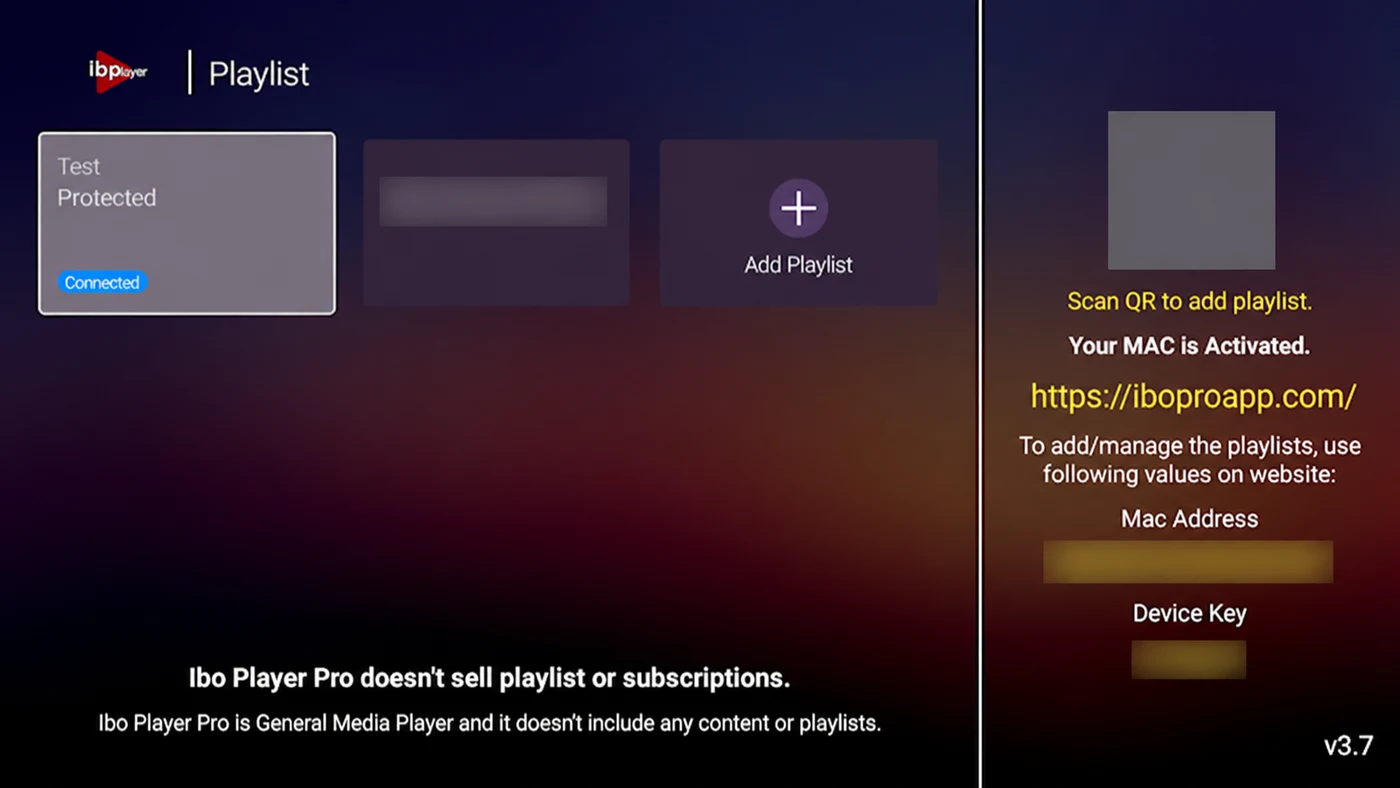
- 2The app shows a device key and a MAC address. Leave that screen open.
- 3On a phone or computer, open the activation page the app names on screen.
- 4Enter the device key and MAC, then paste the M3U URL we sent you.
- 5Save, then restart the app on the television. Your channels load.
Amazon Firestick
- 1Install the Downloader app from the Amazon Appstore.
- 2In Downloader, enter code 481220, or the URL iboproapp.com/ibopro.apk.
- 3Install the downloaded file and open Ibo Player Pro.
- 4Note the device key shown, and register your M3U URL against it on the activation page.
- 5Reopen the app to load your list.


Why there is no username field
Ibo Player Pro ties a playlist to a device rather than to a login, which is why there is nowhere in the app to type a username and password. Use the M3U URL we send you. Keep your Xtream Codes details for other players — they still work there.
Troubleshooting
The app still shows no channels after I registered
Close it completely and reopen it rather than just going back — the app reads its playlist at startup. If it is still empty, check the M3U URL was pasted in full.
I am asked for an activation code
Some builds require a code purchased from the developer. That is their charge, not ours, and it is separate from your subscription. If you would rather avoid it, IPTV Smarters Pro has no such fee.
I replaced my television
The activation is tied to the old device key, so a new set means registering again with the developer. Your subscription with us carries over unchanged.
Frequently asked questions
Are you IBO Player, or affiliated with it?
No. Ibo Player Pro is made by another company, we have no connection to them, and their trademarks are theirs. We provide a subscription that works inside their app.
Can I move my playlist to a different app later?
Yes. The subscription is ours and portable; the activation fee is the app's and is not. The same credentials work in IPTV Smarters Pro, TiviMate and others.
Is the device key the same as my MAC address?
They are usually shown together but are not the same thing. Enter whichever the activation page asks for, exactly as the television displays it.
Need a playlist to register?
Get a 24-hour free trial on WhatsApp, or pick a plan and we will send your M3U link.